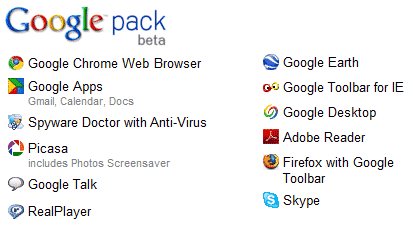
What is Google Software Pack?
Google software pack is a free collection of software from one of the world's biggest IT companies. The collection includes useful software for everyone including web developers. In fact, a few of the software is essential for web developers.
The Google software Pack offers utilities for image management, virus scanning, spyware and adware detection and removal, internet browsing, searching, voice, video and IM communication and much more.

Google Pack includes essential software for web developers
According to me the five essential software for web developers included in the Google software pack are the Chrome and Firefox web browsers, Google Toolbar for Internet Explorer, Google Desktop and Skype. And why do I think these are so important... read on.
Google free web browser Chrome was not a part of this software collection till it came out of the beta version. however, its now the first program in the list and carries a check mark by default. This is one browser you HAVE to check out, especially, if you are a web developer - experienced or a newbie. Chrome offers an uncluttered work space with no distracting icons and uncessary buttons. In fact, the one text field at the top allows you to enter both URL and search query (searches performed using the Google search engine) - really neat!
The usage of the Firefox browser has been steadily increasing -
statistics from this web site show that more than 40% visitors surf the web with Firefox. No web developer or web designer worth his/her salt can be without this browser. It is imperative that when you design a web site you not only check it in Internet Explorer but also Firefox web browser.
The tons of free Firefox Addons make it a must have software.
The Google Toolbar, which comes with Firefox, but has to be installed for Internet Explorer is an indispensable tool. In addition to a pop-up blocker, AutoFill (saves you time, as you no longer need to fill up online forms each time), SpellCheck (helps you correct typos and spelling errors), the Google Toolbar has some really nifty things for web developers. The one I like the most is the
Enhanced Search Box in which you can type your query directly and search the Google database. The new feature of this search box is that it offers "useful suggestions based on popular Google searches". Now these suggested queries
may help you fine tune your keywords (this is not to challenge the fabulous
Google Adwords Keywords Tool). The other two favorite elements of the Google Toolbar that I really like are
PageRank Display (all web developers know this or
should know about the Google PageRank) and
Bookmarks with which you can "create and label bookmarks that you can access from any computer".
The Google Desktop is one great piece of software. The main reason I first installed it was to have a better search tool on my computer - to replace the Search feature provided with Windows. But man... this is way-way more than a simple search tool. It has these little elements called the Google Gadgets like the Scratch Pad and To Do list that I now cannot live without.
Skype is a communications software tool and if you don't have it (or worse, don't know about it), you are missing out on a lot of time+money savings as well as fun. I use Skype (and Google Talk, which is another software that comes with the
Google Pack) regularly to keep in touch with my customers (who are in 7 different countries). No more emailing and waiting for a reply and then emailing again. With Skype I can make calls to my customer's telephone line for pittance. By the way, Skype to Skype calls are 100% free. So if you have your friends/relatives residing abroad you can ask them to install this software on their systems and then you would be able to talk endlessly... and it's free!
Source : http://www.webdevelopersnotes.com


 Posts


 Thunderbird 2 features many new enhancements to help you better manage your unruly inbox, and stay informed. Thunderbird 2 scales to the most sophisticated organizational needs while making it easy to find what you need.